
Navigating the Browser Sign-In Entry Point Safely
When you attempt a session entry through the official PositiveSingles website from a desktop browser or mobile device, reaching the correct page safely requires careful attention to web navigation fundamentals. This audit-led guide examines how to approach the sign-in process while avoiding unauthorized traps, fraudulent notifications, and common browser pitfalls. Security and identity protection begin long before you type your credentials into a form field. By relying on official browser pathways rather than unsolicited incoming links, you significantly reduce the risk of credential interception.
This assessment reviews the structural elements of the official home page, which exposes the sign-in entry point directly. Independent platform reviews, such as the comprehensive analysis published by Katie Kottemann, MA, PhD in the Innerbody review, describe the account creation and initial credential setup process. However, neither Dr. Kottemann nor any other external reviewer has evaluated this specific article. To ensure reliable navigation, readers should examine the quality of available evidence, understand the inherent limitations of browser-based sessions, and utilize a concise decision tool before entering any private details online.
Evaluating Official Sign-In Evidence and Platform Documentation
Read the primary-record approach in our positivesingles com lawsuit explainer.
Understanding how a digital service structures its entry mechanisms helps differentiate genuine portals from deceptive lookalike pages. Platform documentation outlines specific protocols for managing credentials, handling forgotten passwords, and addressing account restrictions. Reviewing these instructions prior to starting a browser session establishes a baseline of operational safety.
Provider Instructions on Password Resets and Expiry Timelines
According to the official provider FAQ, if you misplace your password, a reset link is emailed directly to the address associated with your profile. The provider notes that this reset email may occasionally land in a spam or junk folder, depending on your email provider’s filtering rules. Furthermore, the reset link carries a strict operational window and expires within 24 hours of generation. If the link lapses, you must request a new one through the standard interface.
Verification Prompts and Account Suspension Disclosures
The provider FAQ also addresses uncommon sign-in obstacles, explaining that a sign-in verification prompt may sometimes indicate that an account was held or suspended. When this occurs, the documentation directs the member to contact the provider directly through official support channels rather than attempting repeated unauthorized logins. Additionally, the provider issues a permanent security warning stating that the company will never email asking for sensitive account information, such as full passwords or financial credentials.
Recognizing Phishing Attempts and Deceptive Messaging
Cybersecurity threats frequently rely on urgency and impersonation to trick individuals into revealing private information. Recognizing these tactics is essential for anyone navigating the web. Official regulatory bodies provide explicit frameworks for identifying deceptive communications.
Federal Trade Commission Guidance on Phishing Recognition
Official guidance from the Federal Trade Commission (FTC) advises consumers to contact a company through a website or telephone number already known to be real, rather than responding to an unexpected message, email, or text. Phishing attempts often feature alarming claims about account closures or urgent verification demands designed to bypass critical thinking. Independent evaluations of these digital risks emphasize that secure navigation depends on verifying domain names before interacting with any login prompt.
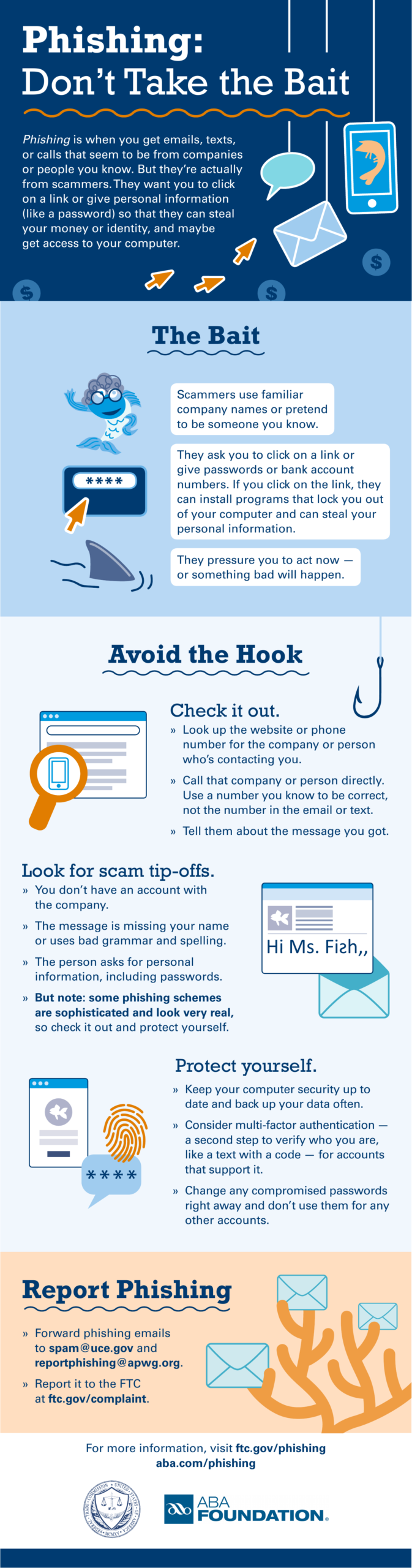
Evaluating Unexpected Communications and Domain Authenticity
When evaluating incoming messages, look for mismatched sender addresses, generic greetings, and pressure tactics that demand immediate action. Official notices from legitimate platforms will direct you to navigate to the primary domain independently rather than embedding direct credential-harvesting links. By maintaining skepticism toward unsolicited prompts, you protect your digital identity from unauthorized actors.
Managing Credentials and Shared-Device Security Protocols
Apply a source-weighted method with our positive singles reviews audit.
Security practices extend beyond initial sign-in navigation to include how passwords are generated, stored, and managed across multiple devices. Implementing robust credential management significantly hardens your personal security posture.
Government Recommendations for Strong Passwords and Managers
The CISA strong-password guidance recommends using strong, unique passwords for every online account combined with a reputable password manager. Reusing passwords across multiple platforms creates a single point of failure where one compromised site can expose your entire digital footprint. Password managers automate the generation and storage of complex alphanumeric strings, removing the need to memorize vulnerable personal combinations.
Precautions for Public, Shared, and Multi-User Computers
Accessing your account from a public library, shared household computer, or workplace terminal introduces distinct risks. The provider FAQ specifically advises signing out completely and clearing the browser cache and cookies upon finishing your session on shared computers. Leaving a session active without clearing local storage data can allow subsequent users of the same device to access your private browser history and active accounts.
Audit-Led Evidence Quality and Decision Matrix
To assist readers in evaluating the safety of their login procedures, the following matrix synthesizes source-labelled observations and practical reader checks. This structured approach outlines what different evidence tiers support and where the operational boundaries lie.
| Evidence Source | Observed Claim or Instruction | Practical Reader Verification Check |
|---|---|---|
| Official Provider Homepage | Exposes the direct sign-in entry point for members. | Verify that the browser address bar displays the exact official domain before typing credentials. |
| Provider FAQ | Password reset emails expire in 24 hours and may land in spam. | Check your spam folder promptly if a reset email does not arrive in your primary inbox. |
| Federal Trade Commission | Contact companies via known real channels rather than unexpected texts. | Ignore urgent messages with links and navigate independently to the verified website. |
| CISA | Use unique passwords and a password manager. | Audit your stored credentials to ensure no passwords are duplicated across platforms. |
Following these verification checks helps maintain operational security. To further minimize risks during your browser session, apply the following actionable habits:
- Type the web address manually or use a verified bookmark rather than clicking links in unsolicited emails.
- Ensure your browser displays a secure connection indicator before entering any private data.
- Never save your password on public, library, or shared family computers.
- Close all browser windows and clear local cache data immediately after concluding a session on a shared device.
Browser Login Navigation Questions and Decision Support
Step back and assess broad platform fit with our positive singles guide.
Navigating digital account access safely requires clear answers to common operational questions. The following section addresses frequent browser login concerns using verified source documentation.
What should you do if your password reset email does not arrive?
If you request a password reset and the email fails to appear in your primary inbox, check your spam, junk, or promotional folders. Provider documentation confirms that automated messages frequently get redirected by aggressive email filters. If the message is not found within a reasonable timeframe, verify that you entered the correct email address associated with your profile and initiate a new request through the official sign-in page, keeping in mind that reset links expire within 24 hours.
Why might a sign-in attempt trigger a verification or suspension prompt?
Encountering a sign-in verification prompt that indicates an account is held or suspended signals an administrative restriction on the profile. According to official provider guidance, members who encounter this specific message should contact the support team directly rather than attempting repeated logins or circumventing the prompt. Trying to bypass an account hold through secondary profiles or alternative browser tricks can violate platform terms and complicate resolution.
How can you verify that a login page is authentic before entering credentials?
Verifying authenticity begins by inspecting the browser address bar to ensure the domain matches the expected official URL without subtle misspellings or deceptive character substitutions. Government and consumer protection guidance advises treating any unexpected message or pop-up window with extreme caution. Always navigate to the platform through your own established bookmarks or search engine results rather than clicking links found in suspicious correspondence.